Courier Management Software for Businesses in India
PNG Informatics Private Limited is a courier management software company in India, building systems that run a courier operation end to end — booking and AWB generation, shipping labels, pickups, tracking, proof of delivery, COD recording and billing.
This is custom courier management software rather than a fixed product: it suits courier companies running their own branches and delivery staff, logistics operators handling consignments for business clients, and distributors dispatching to a dealer network. Like the rest of our courier software in India, each build is scoped around how your consignments actually move.
AWB
Numbers & Labels
POD
Signature, Photo or OTP
COD
Collection & Reconciliation
Multi-Branch
Roles & Permissions
Everything You Need To Run Your Courier Business
The Courier Management System helps courier companies simplify their daily operations and improve delivery efficiency.
From creating shipments to tracking parcels, managing delivery staff and generating reports, every important operation can be handled from a single platform.
Reduce manual work, improve customer communication and maintain accurate courier records with a modern, easy-to-use management solution.

Smart Dashboard
Manage your courier operations through a simple and user-friendly digital dashboard.

Quick Shipment
Create new shipments quickly with complete sender, receiver and parcel information.

Parcel Handling
Keep your parcel information organized from pickup through final delivery.

Customer Support
Improve customer communication and provide timely support throughout the delivery process.
Easy API Integration With Multiple Vendors
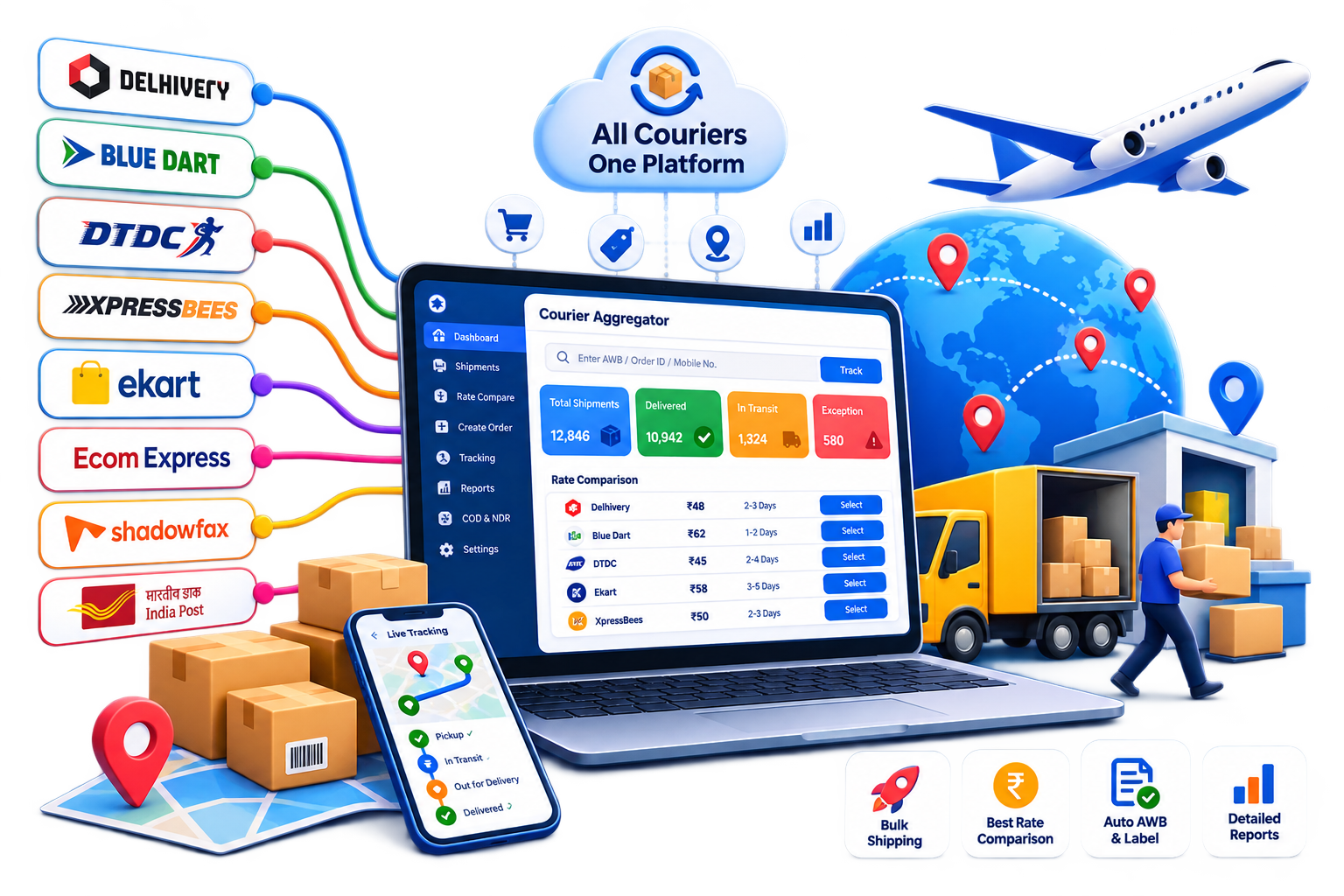
Connect your courier business with multiple shipping and logistics providers through a single, easy-to-manage platform.
Integrations can be built for partners such as Blue Dart, DHL, DTDC, Delhivery and FedEx, so your team books, labels and tracks from one system instead of a separate portal per provider.
These are examples of vendors our courier platform work has covered, not an official partnership or a pre-built connector list. Each integration needs your own account with that courier, API credentials and permissions issued to you, and configuration per partner — their label format, their status vocabulary and their rate structure. What is available for a given partner depends on what their API exposes to your account, so the specific list is confirmed during project planning.
Multiple Courier APIs
Connect and manage multiple courier vendors from one platform.
One-Click Label Generation
Generate shipping labels instantly after booking a shipment.
Automatic AWB & Tracking
Automatically receive AWB numbers and tracking information from the connected courier.
Illustrative integration workflow. Vendor names are examples of partners an integration can be built for, subject to your own account with that courier and the access their API grants it.
Complete Courier Business Solution
Designed to make courier operations faster, simpler and more organized.
Shipment Management
Book a consignment with sender, receiver, contents, weight and service level, and the system issues the AWB and a scannable label in the format the receiving hub expects. Single bookings, bulk upload for a day’s orders, and cancellation while the shipment is still with you.
Parcel Tracking
Each scan — picked up, received at hub, in transit, out for delivery, delivered — updates one shipment record. Your staff see the internal view; your customers check status themselves on a tracking page using an AWB or reference, which removes most routine status calls.
Customer Management
Account customers hold their own contact details, pickup addresses, agreed rate card and full shipment history. That history is what makes periodic invoicing and a billing dispute straightforward rather than a reconstruction from paperwork.
Delivery Management
Allocate the day’s consignments to delivery staff by area and load, hand them over by scan so responsibility is recorded, and follow the run as it happens. Proof of delivery is captured at the door as a signature, photograph or OTP and attaches to the shipment record.
Billing & Payments
Freight is calculated per consignment against that customer’s rate card — weight slab, zone, service type and surcharges — then accumulated across the billing period and invoiced with the supporting shipment detail attached. COD collections are recorded per shipment for reconciliation.
Reports & Analytics
Shipments by status and period, delivery performance, COD collected against COD outstanding, revenue by customer, and branch or staff activity. Reports are shaped around the decisions you actually make, which is usually fewer numbers than a generic dashboard offers.
Manage Every Delivery With Ease
A consignment usually passes through all seven stages below. Not every operation needs every one — a single-branch courier may have no hub movement, and a prepaid-only business no COD reconciliation. Which stages apply to you, and how each should behave, is agreed during scoping rather than assumed.
Booking
Sender, receiver, contents, weight and service level are captured and the consignment record is created. Pricing is applied from the customer’s rate card at this point.
AWB & Label
An AWB number is issued — from your own series, or from a connected partner’s series — and a scannable label is produced in the layout the receiving hub expects.
Pickup
A pickup is raised by staff or from an incoming order, assigned to a person or route with a time window, and closed as collected or failed. A failed pickup triggers a reschedule.
Manifest & Hub Movement
Consignments are grouped onto a manifest for movement between branches or hubs, scanned out and scanned in. Scanning discipline here is what makes later tracking trustworthy.
Delivery Assignment
The day’s consignments are allocated to delivery staff by area and load, then handed over by scan so responsibility for each parcel is recorded rather than assumed.
Delivery & POD
The attempt is completed and proof captured at the door — signature, photograph or OTP — and attached to the shipment. COD is recorded against that consignment as it is taken.
Billing & COD Reconciliation
Freight accumulates against the customer’s rate card for periodic invoicing, and collected cash is reconciled against what is handed in at the end of each run.
Failed Attempts, Reattempts and Returns
Successful deliveries largely look after themselves. What costs money is the exception path, and how it is handled is worth settling before a system is built.
A failed attempt should close with a specific reason rather than a generic “not delivered”. The difference matters because the reasons lead to different actions: nobody at the address needs a call and a new time; an incomplete address needs correcting before anyone goes back; a refused parcel should move to return rather than consume two more attempts.
Each unsuccessful attempt is recorded against the consignment with its reason, and the follow-up — contact the customer, reschedule, or convert to return — is what keeps a parcel from quietly sitting in a depot. A consignment that cannot be delivered goes back to origin as an RTO, and tracking the reasons behind those returns is usually worth more than tracking the volume.
How many attempts you allow, who decides a return, and whether customers can reschedule themselves are business rules rather than fixed software behaviour. They are defined during scoping. The wider exception workflow is covered on our delivery management software page.
Questions Worth Settling Early
Five areas that decide how well a courier system fits your business, and where the cost of a project is actually determined.
Branch Access & Permissions
Branches can be set up as separate booking points with their own users, each seeing its own consignments while reporting rolls up centrally. Who may edit a rate, cancel a shipment, write off a COD shortfall or view another branch’s numbers is a permissions decision, and it is far cheaper to define before build than to retrofit afterwards.
Rate Cards & Periodic Billing
Courier billing and tracking software lives or dies on this. Courier pricing is rarely one number: it varies by client, weight slab, zone, service type and surcharge. Account customers are billed periodically rather than per shipment, with freight accumulated over the period and invoiced with the supporting shipment detail attached. Software that cannot model your commercial terms pushes billing back into spreadsheets — usually the exact work you were trying to remove.
COD Collection vs Settlement
These are two different records, and conflating them is where money goes missing. Collection is what the delivery executive took at the door, recorded per consignment with the payment mode. Settlement is what was physically handed in, deposited, then remitted to the client. Reconciling the two per run — rather than at month end — keeps a discrepancy solvable while people still remember the day.
Implementation & Migration
Moving from an existing system means extracting, cleaning and importing historical data, and legacy data is rarely as clean as expected. Decide early how much history to bring across, who is responsible for cleaning it, and how you will run the old and new systems together during cutover. Branch staff and delivery teams need training on the parts they actually use.
What Affects Project Cost
Number of modules and user roles, how many branches and how complex their permission rules are, how many courier or system integrations, whether mobile applications are needed, data migration, and the level of ongoing support. Integrations are the item most often underestimated. We quote after a requirement discussion rather than before one.
Confirmed Features vs Project Scope
The capabilities described on this page — booking, AWB and labels, pickups, tracking, proof of delivery, COD recording, rate cards, billing, branches and reporting — are what our courier platform work covers. Anything beyond them is a requirement to discuss, not an assumed module. If you are still comparing providers, our guide to choosing a courier software company sets out the criteria and the questions to ask.
What Will It Cost?
Modules are scoped per project, so what you pay depends on what your operation actually uses. We set out how that works — essential modules, optional scope and what a quotation accounts for — on our affordable courier software page.
Get a Quotation →Courier Management Software FAQs
Questions we are asked most often when a courier business is planning a new system.
What modules does courier management software usually include?
At minimum: shipment booking, pickup management, AWB and label generation, tracking, delivery and proof of delivery, customer management, billing and reporting. Which of those you actually need depends on whether you run your own network, work through partners, or both.
Can the system handle multiple branches or franchises?
Yes. Branch structures can cover separate booking points, branch-level users and permissions, inter-branch shipment movement, and reporting that rolls up centrally while letting each location see its own numbers.
How does AWB numbering work?
AWB numbers can follow your own series and format rules, or use the number series issued by a connected courier partner. Where you work with several partners, each one typically has its own series and the system keeps them separate against your internal shipment record.
Can it generate shipping labels for different courier partners?
Label generation is part of the platform. Each partner expects its own layout and barcode format, so a partner-specific label depends on an integration being built and configured for that courier. Getting this right matters more than it sounds — a label that does not scan at a partner's hub is one of the most common causes of a shipment stalling.
How does pickup scheduling work?
Pickup requests can be raised by staff or generated from incoming orders, then assigned to a person or route with a time window. Status moves through requested, assigned, collected or failed, and a failed pickup can trigger a reschedule rather than disappearing.
Can customers track their own shipments?
Yes. A customer-facing tracking page lets a recipient enter an AWB or reference and see the current status and timeline, which removes a large share of routine "where is my parcel" calls from your support team.
How are rate cards handled when pricing differs per client?
Courier pricing is rarely a single number — it varies by client, weight slab, zone, service type and surcharges. Rate cards are configured so each customer is billed on their own agreed terms, which is what keeps billing out of spreadsheets.
How is billing handled for corporate clients?
Corporate accounts typically bill periodically rather than per shipment. Freight is calculated per consignment against the client's rate card, accumulated over the billing period, then invoiced with the supporting shipment detail attached.
What reports does courier management software provide?
Commonly: shipments by status and period, pickup and delivery performance, COD collected and outstanding, NDR and RTO volumes, revenue by customer, and branch or staff performance. Reports are more useful when shaped around the decisions you actually make.
Does the delivery app work without a network connection?
Offline capture is a normal requirement for delivery work, because staff regularly work where coverage is poor, and an app that needs a live connection tends to get worked around. Whether offline capture and background sync are included depends on the mobile app scope agreed for your project, so it is worth stating as a requirement rather than assuming it.
Ready To Simplify Your Courier Operations?
Tell us how consignments move through your business today — branches, volumes, the couriers you work with and what it needs to connect to — and we will come back with what it would take.
Discuss Your Requirements →Working through courier partners rather than your own network? See courier aggregator software. Need the wider operation covered too — logistics management or warehouse management? For custom development, start at courier software development. Still choosing a supplier? Read our guide to choosing a courier software company.